Showing posts with label Data recovery. Show all posts

Wednesday, 10 September 2014

Duplicate File Finder

Free Duplicate File Finder will find all duplicate files on your computer or inside a selected folder regardless of the file names comparing the file content.
The applications will compare the binary data of your files and will find duplicates even if they are using different file names.

It uses an optimized Byte-by-Byte comparison algorithm
The internal preview supporting a lot of image, video, music and text file formats. You can also preview the files in binary mode.

Option to exclude folders from the auto mark.

Protection for system files and folders.

Read more about deleting duplicate files
While Fast Duplicate File finder can find 100% identical files it also includes options to find similar files and files with similar names.
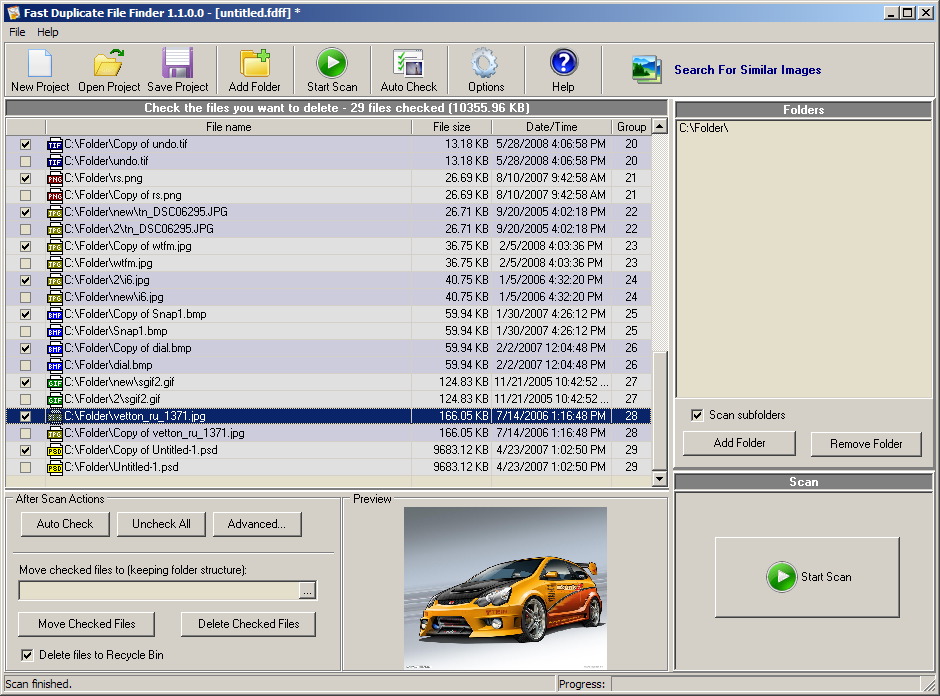
Finding similar files is hand when looking for different revisions of the same document. FDFF can find similar files in any format.
The feature for finding similar file names works in the same way, but instead of the file content it compares the file names.
The similarity mode does not provide just a simple FUZZY MATCH algorithm. It performs a complex analysis and can recognize two similar documents even if entire paragraphs inside are rearranged.
FDFF is so powerful that it can even find archives winch contain the same files or their older or newer versions.
Fast duplicate files is a handy FREE disk cleanup tool.

Duplicate MP3 Finder

Duplicate Mp3 Finder is an innovative tool that can recognize duplicate audio files even if they are stored in different file formats and not marked with ID3 tags.

The duplicate music finder will find fast all similar or exact duplicate audio files in a folder and its sub folders.

Unlike common duplicate file finders it will actually "listen" to your music and can recognize a song even if it is saved in different file formats.

Supports MP3, MP2, MP1, MPA, WAV, OGG, AIFF, AAC, MP4, FLAC, AC3, WavPack (WV), Musepack (MPC) and Windows Media Audio (WMA) file formats, has an intuitive user interface and is well documented.
Read more about removing duplicate Mp3 files
Audio Dedupe is a music manager application and can help to organize an audi collection. The main benefits of using this tool are:
  • Organize music library
  • Remove annoying duplicate songs
  • Save valuable disk space by removing duplicates
  • Find similar songs and group them together
Audio Dedupe can easily remove duplicate songs from iTunes, iPhone, iPad or iPod.
While the tool does not rely on ID3 tags in order to identify duplicates it will display detailed information for every duplicate item. This includes song length, bits per sample (quality of the file), Name, Location, ID3 Tags like Album, Artist and Song Title, Date and many more.
Having the above information in a neat table makes sorting through duplicate mp3 files and organizing an audio collection an easy task.

Duplicate Photo Finder

Duplicate Photo Finder will find all similar and duplicate pictures and photos on your computer. More than 300 image formats are supported including RAW.

The duplicate image finder tool uses advanced algorithms in order to find similar photos in a way that a human does. Due to that fact it can find duplicate images even if they are in different image formats, different bit depth and image sizes.

You can specify a percent of image similarity that will be used during the scan.
There is a handy Image Search option that can find similar images to a preloaded sample.
Supports also EXIFF timestamp search that will let you find photos shot in burst mode.Read more about cleaning duplicate photos.
VSDIF is rated the best duplicate image finder tool on many photography web sites and blogs and is used by professional photographers.
It can analyze hundreds of thousands images in minutes and store information in a database that can be reused in consequential scans.
VSDIF will save gigabytes of valuable disk space by removing duplicate pictures.

Thursday, 29 August 2013


I CARE DATA RECOVERY CRACK 5.0


 I CARE DATA RECOVERY CRACK 5.0
  1.   Reformatted partition, memory card, camera/phone card by accident?
  2. Corrupted MBR and cannot find your partition or USB not detected?
  3. Accidentally deleted partition, partition lost?
  4. Drive became RAW, chkdsk reports not available for raw drives?
  5. SHIFT+DELETE, emptied Recycle Bin, need file recovery?
  6. Recover files from RAID?
  7. Data loss without a reason, Need recovery software?
  8. Partition software failure?
  9. drive/card reports not formatted, do you want to format it now?
  10. Windows 8 compatible data recovery
  11. Preview lost photos, office files before purchase
  12. Works with HFS, HFS+ Mac drives if connected to Windows PC

Data loss won't be your headache! As a comprehensive data recovery solution, iCare Data Recovery can easily recover files from wrong formatted drives, unexpectedly file deletion, raw drive or raw file system, virus attack, partition deleted, software crash etc. It can recover any deleted files like photos, documents, mp3, outlook file, presentations, and it also works with any type of storage media like hard drive, removable hard drive, digital cameral sd card, usb drives, ipod, memory card etc.

right click

Related Posts Plugin for WordPress, Blogger...

Definition List

Blogger Tips and TricksLatest Tips And TricksBlogger Tricks

AddThis

Social Icons

Follow Us