Tuesday, 4 March 2014

FREE DOCOMO CALLER TUNE

FREE DOCOMO CALLER TUNE
Docomo caller tune free for lifetime Just dial *678*035# and u will get any song as ur hellotune for free in 10 days.but on the 9 day deactivate it.dial *678#and manage ur profile.and again activate it again dial *678*035#.enjoy its life time free....

FREE BSNL 3G / 2G GPRS Trick HACK APRIL MARCH 2013

FREE BSNL 3G / 2G GPRS Trick HACK APRIL MARCH 2013


Hello friends and loyal readers of RiyaTrick, After a long time I'm going to post Free BSNL 3G GPRS Trick which is confirmed working all over the country. Before I start discussing about this trick I want to tell you that you can read other tricks and hacks for other service providers like Idea, Reliance, Tata Docomo , Uninor and BSNL to check out click here.Click on Read More now.

Now without wasting a single minute lets get back to the trick. First of all I want to tell you that all the tricks on this blog are very easy to implement that is why you need not to worry. Today's trick works on proxy setting as the previous one Airtel Proxy trick. It means you have to create a new configuration setting in mobile phone and after that you have to restart your phone.

How to Configure BSNL 3G GPRS Trick :

1. Mobile:-


Create New Configuration Setting in Mobile Phone using following data : 
Account Name : RiyaTrick
Access Point Name : celloneportal
Proxy Address : 192.168.87.163
Port : 8080
Homepage: http://wap.yahoo.com or http://riyatrick.blogspot.in
Save Setting and Restart Mobile Phone. Enjoy FREE 3G GPRS :)

2. PC:-


How to Configure BSNL 3G GPRS Trick 2013 in Mozilla Firefox :
Open Mozilla Firefox and Configure it
Note : You must have active connective using cellopneportal as APN
Go to Menu >> Options >> Advanced >> Network >> Settings >> Manual Configuration
Input PROXY and PORT given below :
Proxy : 192.168.87.163
Port : 80
Set Homepage : wap.yahoo.com
Save Setting and Enjoy!! Free Internet on Computer :)
If you face any issue in setting up BSNL 3G Trick March 2013 bring it to us by commenting.

Note:- 100% working IDEA FREE 3G working on August 2013 Click Here

BSNL TRICKS

Good news 4 BSNL USERS:

Please dont post that its n0t working i myslef used this trick and 100% Working:

▼
BSNL 3G HACK TRICK September 2012
It wont work in gujrat or mah...working in north side andin roaming sim but u all can try
Make two apn
1st apn
bsnlnet.mnc0xx.mccxxx.gprs
replace xxx by ur respective state mnc and mcc code for bsnl
MCC-MNC code
404-38 BSNL Assam
404-34 BSNL Haryana
404-53 BSNL Punjab
404-54 BSNL Uttar Pradesh (West)
404-55 BSNL Uttar Pradesh (East)
404-57 BSNL Gujarat
404-58 BSNL Madhya Pradesh
404-59 BSNL Rajasthan
404-64 BSNL Chennai
404-66 BSNL Maharashtra
404-71 BSNL Karnataka
404-72 BSNL Kerala
404-73 BSNL Andhra Pradesh
404-74 BSNL West Bengal
404-75 BSNL Bihar
404-76 BSNL Orissa
404-77 BSNL North East
404-79 BSNL Andaman Nicobar
404-80 BSNL Tamilnadu
404-81 BSNL Kolkata
2nd apn
bsnlnet
how to connect:
1: connect wid first apn
it will say connection terminated
2: quickly connect wid second apn(bsnlnet)
done enjoy free gprs...
Maintain high bal(above 5rs) and that wont deduct... Enjoy.
Hit LIKE AND SHARE

BSNL Prepaid 3G fast Internet TRICK [MP/CG]

For BSNL Prepaid, MP/CG Circle……………………………………..
In One Word Just Use “bsnllive” access point instead of “bsnlnet”.
It’s working fine and fast with 3G network and there is no main balance deduction with this access point (bsnllive), it just deducted from the Data Balance as in bsnlnet access point. The main difference in both access point is of internet Speed only ….It’s not a free internet trick, you will only get a faster internet speed.
With Bsnlnet acess point which is default access point you will get average downloading speed of around 12-15 kbps on 3g network, but with the “bsnllive” access point you will get a fast downloading speed of around 25-30kbps, u will get this speed with a 2G internet pack of BSNL.
All you need to do is to change the proxy setting in your internet browser and connect to the Internet with the BSNLLIVE access point. You can surf internet by either using Net setter or can connect using your 3g mobile.
Here’s the Proxy Setting for the access point BSNLLIVE
Proxy Address: 10.220.67.131
Proxy Port: 8080
You will have to change your internet browser’s setting to use this proxy address as well as the Proxy port.
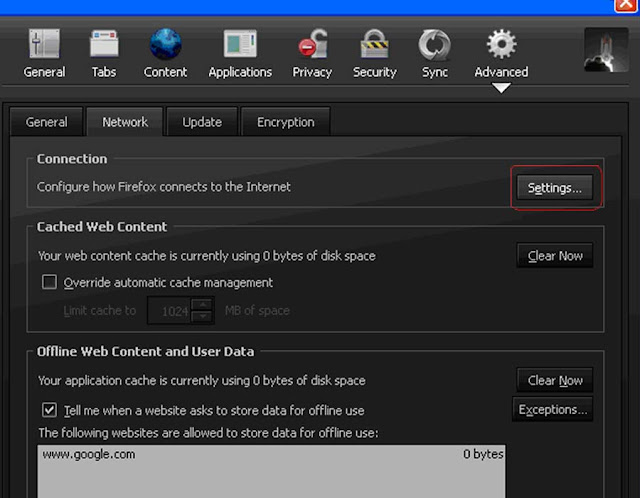
Proxy settings for Mozilla Firefox:
1.     Open your Mozilla Firefox go to tools > options.
2.     Click on Advanced then click on Network tab.
3.     On the Network tab you will see a Settings button, click it.
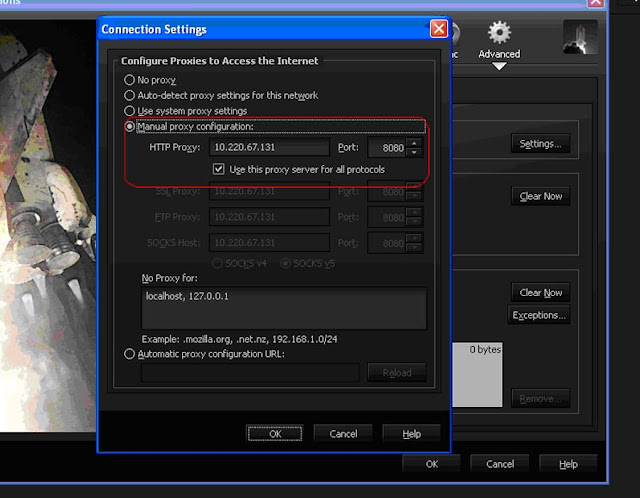
4.     A new window will appear and you will see a message Configure Proxies to Access Internet.
5.     By Default it is selected to No Proxy setting. Now click on the Manual Proxy configuration.
6.     After that you will see two blank spaces first on is HTTP Proxy and second one is Port.
7.     Enter 10.220.67.131 in HTTP Proxy.
8.     Enter 8080 in Port. Click OK and then exit the settings. Now connect to Internet by using BSNLLIVE access point and surf the Net. It should be working fine and Fast.
https://blogger.googleusercontent.com/img/b/R29vZ2xl/AVvXsEhYFyQ9P3LvgTD6hbBcwLnNSr1pVZ2-bWa3Qf0mbCEJaZ_cJkmPa1GaG5EfRnksGJmXPD_Zy2YxddZWieQQTuzqBJMXNNPLLLzgc_dEP4F4edxTxiywdpYL_oGC1ooQQ0r5ONst5I7BQHlP/s1600/11.jpg


Proxy settings for Chrome:
Proxy setting in Chrome is different from Firefox. Here are the steps to change the Proxy.
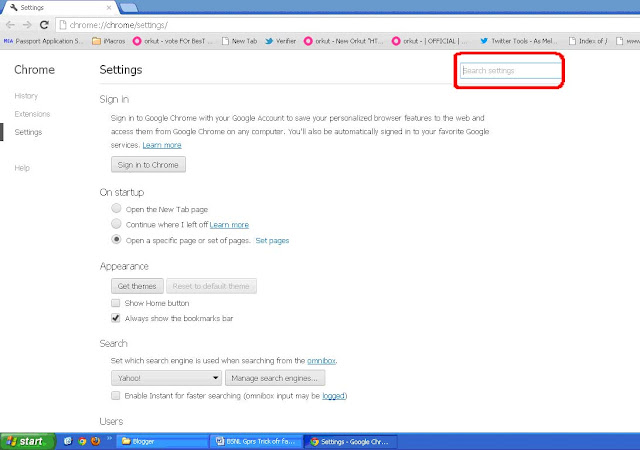
1.     Open Chrome browser and go to the Settings.
2.      In the setting you will see a Search Setting.


1.     In the search Settings Type “Proxy”.
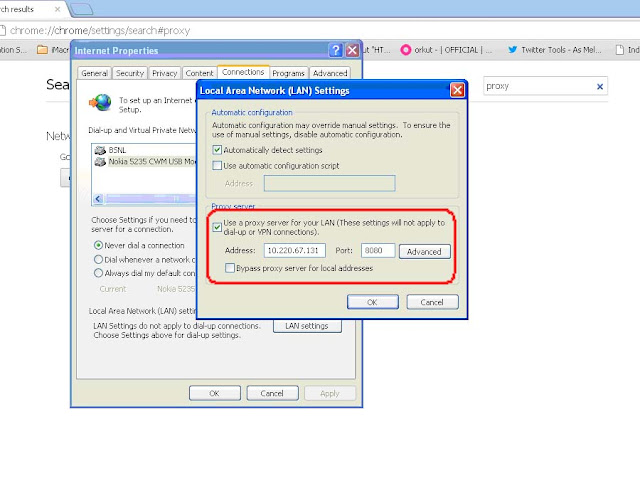
2.     Now Click on the Change Proxy Settings.
3.     A new Internet Properties window will appear.
                   

1.     See at the bottom most of this window you will see a Local Area Network (LAN) Setting, click on the LAN Settings.
2.     Now tick mark the box saying Use a Proxy Server for Your LAN.
3.     Enter the Proxy port and proxy address mentioned above. Exit the whole settings and then connect to the Internet with BSNLLIVE access Point.
But Read few words of Caution:

1.     Use this setting for Internet browsing and downloading only.
2.     Don’t use this for online Bank Transactions or filling exam forms.
3.     Do check your main balance after web surfing for few minutes.

Monday, 3 March 2014

Snipping tool for windows xp service pack 2

Snipping tool for windows xp service pack 2
Snipping Tool is an application included in Windows 8, Windows 7, Windows Vista, and Experience Pack for Windows XP Tablet PC Edition 2005. It was originally released as a powertoy for the Tablet PC launch on November 7, 2002. The program is a screen-capture tool that allows taking screenshots (called snips) of an open window, rectangular areas, a free-form area, or the entire screen. Snips can then be annotated using a mouse or a tablet, saved as an image file (PNG, GIF, or JPEG file) or an MHTML file, or e-mailed.
Snipping tool allows for basic image editing of the snapshot, with different colored pens, an eraser, and a highlighter
Snipping Tool
A component of Microsoft Windows
Snipping Tool Vista Icon.png
Win8 Snipping Tool.png
Snipping Tool in Windows 8
Details
Type Screenshot software
Included with
  • Windows Vista
  • Windows Server 2008
  • Windows 7 (excluding Basic and Starter editions),[1]
  • Windows Server 2008 R2
  • Windows Home Server 2011
  • Windows 8
  • Windows Server 2012
Also available for
Windows XP Tablet PC EditioN


http://content.uploady.com/download/Windows+XP+Snipping+Tool_2.zip?f=Windows+XP+Snipping+Tool_2.zip&fid=k78rXItvLGL&p=AsAGKHVTH9c&m=application%2Fzip&s=1&tp=remote&t=1393865137&ex=86400&h=51975aed129885ef065cedc9c52adb00f67dd409

Saturday, 1 March 2014

What to do, If your Facebook Account is Hacked

What to do, If your Facebook Account is Hacked


In my last Article, I explained you how to keep your Facebook Account secure and how to protect yourself from Hackers and Cyber criminals.

But what if your Facebook account is already hacked?
Today I am going to provide you a list of instructions, which one must follow to get back his/her Hacked Facebook account.
1.First of all, how do you know that your Facebook account was hacked?

Security Settings
Check the list of Active Sessions under
HOME > ACCOUNT SETTING > SECURITY > ACTIVE SESSIONS.
And you can end the activities of suspicious sessions.
I recommend you to enable login approval for logging in from an unrecognized device or you can also set app password.

2.And if you can’t logging in even though you know your password then it is likely that your Facebook password already has been changed

Facebook hacking using Phishing method

Facebook hacking using Phishing method 
Phishing is the most widely used hacking method for hacking Facebook passwords. The most widely used technique in phishing is the use of Fake Login Pages, also known as spoofed pages. These fake login pages resemble the original login pages of sites likeYahoo , Gmail, MySpace etc. The victim is fooled to believe the fake facebook page to be the real one and enter his/her password. But once the user attempts to login through these pages, his/her facebook login details are stolen away. However phishing requires specialized knowledge and high level skills to implement. So I recommend the use of Phishing to hack facebook account since it is the easiest one.


 How to Create Phishing page


  1.  1)    Take Facebook as Fake Page to hack Facebook ID's
  2. 2)    Download Facebook Phishing page from here.
  3. 3)    Create free a/c on freehosting.com and get free domain
  4. 4)    After creating free a/c and domain go to your Control panel 5)    Click on File Manager


6)     provide your Password

7)    A go in public_html folder and delete default.php file
8)     click on upload and you will be redirected to this page
9)     I suggest you to use ZIP archives to upload it's fast and easy
10)   After uploading your Phishing page
 11)   So after all type your Domain name in Address bar hit enter and you'll get fake fb login page
12)  copy the Address of this page and Go to Google URL Shortener.

13)  Let's check whether our Phishing page is working or not ? Go on your Phishing page       and Enter any fake ID and Password in E-mail and Password BOX 

14)  After providing your fake info click on login and you will be redirected to original facebook login page        and victim E-mail ID and Password will be logged.
15)  How to know the Password ? Again Go to your  hosting website dashboard and   over there you will see another file manager .

16) Go in Another file manager > public_html > After Entering in public_html folder      you will see this 4 files 

17)  Double click on log.txt file and download it.
18) Here you can see how Phishing attack works.


phishing is a illegal activity so don't try on anyone.this tutorial is for educational purpose.
AND MUST LIKE OUR PAGE IN FACEBOOK 
AND WAIT FOR NEXT METHOD OR TRICKS

right click

Related Posts Plugin for WordPress, Blogger...

Definition List

Blogger Tips and TricksLatest Tips And TricksBlogger Tricks

AddThis

Social Icons

Follow Us